
Winem8 Settings
What is a lead time?
Section titled “What is a lead time?”The lead time is inclusive of:
Subscription Renewal Reminder Lead Time - The time between a reminder being sent and an order being created.
Order Fulfilment Lead Time - The time between an order being created and the customer being charged for this order.
Example
Section titled “Example”You have set the following:
- Subscription Renewal Reminder Lead Time — 7 days
- Order Fulfilment Lead Time — 1 day
- Curated Pack Renewal Date — 30th June
This would mean the following process will occur:
-
30th of June — the day the order needs to be charged.
-
29th of June — the admin will need to prepare the pack and create orders.
-
22nd of June — the curated pack reminder email will automatically be triggered and sent via Klaviyo (7 days before the 29th of June).
For the reminder email, it is important to keep the next renewal date on each curated pack as up-to-date as possible. You can do this by editing the curated pack, changing the next renewal date, and clicking save. This will then update when the reminder email is sent.
Where to find Lead Time Settings
Section titled “Where to find Lead Time Settings”- Navigate to Settings in your Winem8 app.

- Scroll down to the section Lead Time Settings.
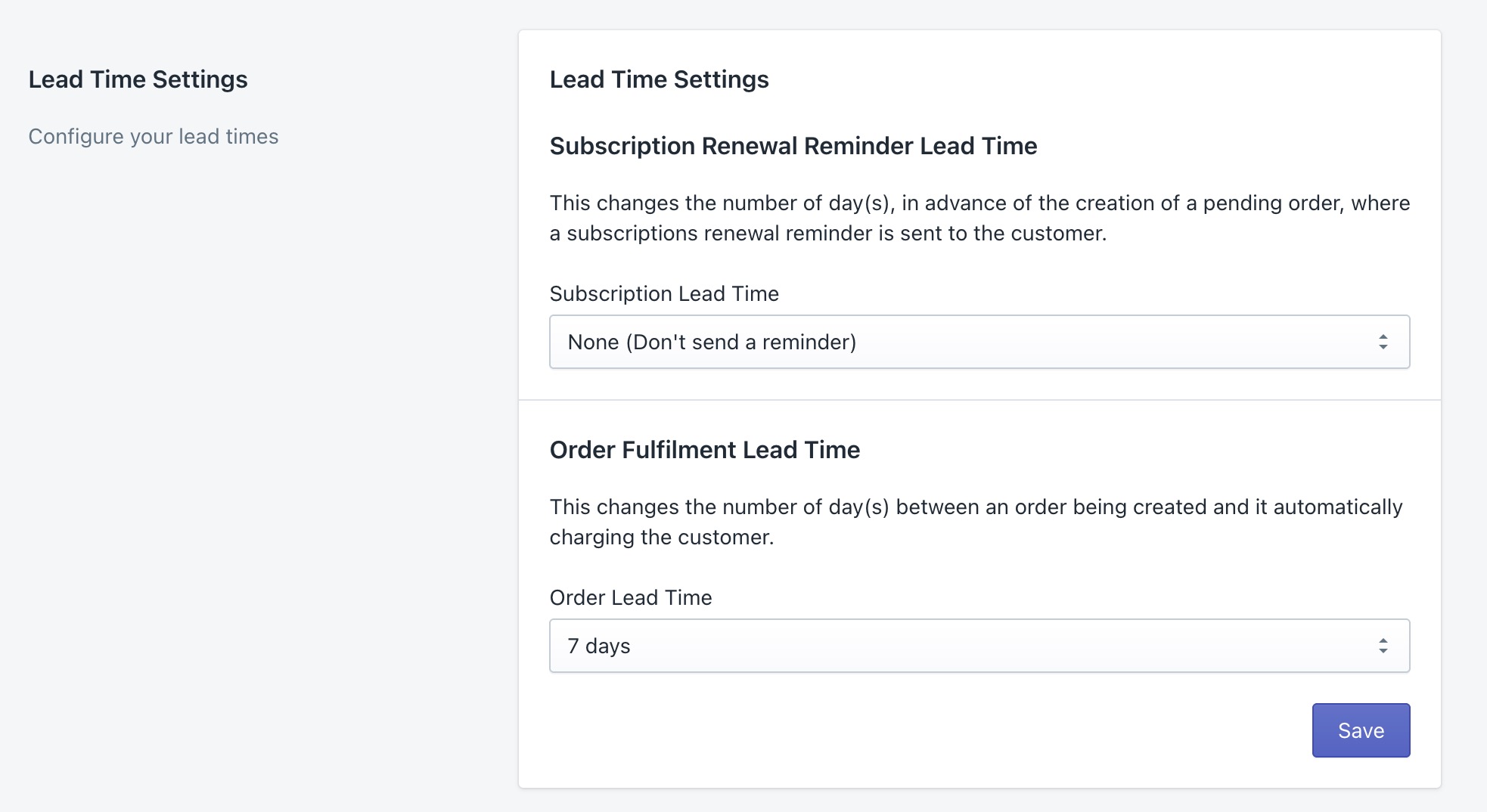
Subscription Renewal Reminder Lead Time
Section titled “Subscription Renewal Reminder Lead Time”Purpose of this feature
Section titled “Purpose of this feature”This feature gives you the ability to customise your wine club experience further — giving you the ability to send reminder emails for custom subscriptions before orders are created (via Klaviyo).
You can give your custom and curated subscription customers a heads up that their order will soon be renewed, and give them time to change their pack if they like.
Setting your Subscription Renewal Reminder Lead Time
Section titled “Setting your Subscription Renewal Reminder Lead Time”This lead time creates 2 metrics in Klaviyo, one for curated and one for custom:
Renew Custom Subscription ReminderRenew Curated Subscription Reminder
Custom Packs
Section titled “Custom Packs”For custom packs, this creates a metric that measures the time before an order is automatically created in one of your custom subscriptions, and allows you to create an automatic flow of communication alerting your customers to their upcoming renewal time.
Example
Say you set your Subscription Lead Time to 14 days and a customer’s order is set to be created on the 14th of February. This subscription lead time will feed the information to Klaviyo, and on the 1st of February an automatic flow will trigger. The Order Fulfilment Lead Time (see below) will then dictate when the order payment is taken.
Curated Packs
Section titled “Curated Packs”For curated, this creates a metric that measures the time before an order is due to be created in a curated subscription. Curated packs are manually triggered by a member of your staff, so it will use the date that you have put in your curated pack to dictate when this trigger is sent.
Example
In a curated pack you have set the next renewal date to be the 14th of February, and the Order Fulfilment Lead Time is set to 7 days. Therefore, you are due to renew this curated pack on the 7th of February, so the Klaviyo metric will trigger on the 1st of February. However, if your Order Fulfilment Lead Time is set to instant (no delay between an order being created and payment being taken) and your renewal date is set to the 14th of February, you are due to click renew on the orders on the 14th of February, and the reminder metric will trigger on the 7th of February.
Important information
Section titled “Important information”- You can only set one subscription lead time, but if you want to send multiple reminders you can set time delays in your Klaviyo flow.
- This metric may occur within 24/48 hours of the intended date, depending on when the order was originally created.
- This lead time cannot be used when manual renewal of custom subscriptions is turned on — it can only be used if custom subscriptions are renewing automatically.
To set this lead time
Section titled “To set this lead time”-
Navigate to Lead Time Settings as per the instructions above.
-
Find the Subscription Renewal Lead Time setting.
-
Click the Subscription Lead Time dropdown.
-
Select the duration you want.
-
Click Save (remember to set the Order Lead Time before clicking save).
-
In settings, navigate to Test Notifications.
-
Enter your email address and click Send Test Notifications — this will ensure the metrics appear in your Klaviyo account.
From there, jump into Klaviyo and create your communication flow.
Order Fulfilment Lead Time
Section titled “Order Fulfilment Lead Time”Purpose of this feature
Section titled “Purpose of this feature”This lead time changes the time between an order being created and the customer’s card being charged.
By default, this lead time is 7 days. For example, the customer’s order is created on the 1st of February, and on the 7th of February their payment details will be charged.
You can also customise how long it is between an order being created and an order taking payment, including no time delay at all. This will reduce confusion with your customers changing their order during this time period, believing that it will apply to the current order.
To set the Order Fulfilment Lead Time
Section titled “To set the Order Fulfilment Lead Time”-
Navigate to Lead Time Settings in your winem8 app.
-
Find the Order Fulfilment Lead Time section.
-
Click the Order Lead Time dropdown.
-
Select the duration you want.
-
Click Save.
Connect with Stripe
Section titled “Connect with Stripe”New customers April 2026 and onwards
Section titled “New customers April 2026 and onwards”We recommend new customers utilise the Stripe 2.0 API connection moving forwards to ensure continued support and access to new features.
- Navigate to your settings tab in the Winem8 app.
- Scroll down to the Stripe Settings section and select ‘Connect via Stripe 2.0 API’
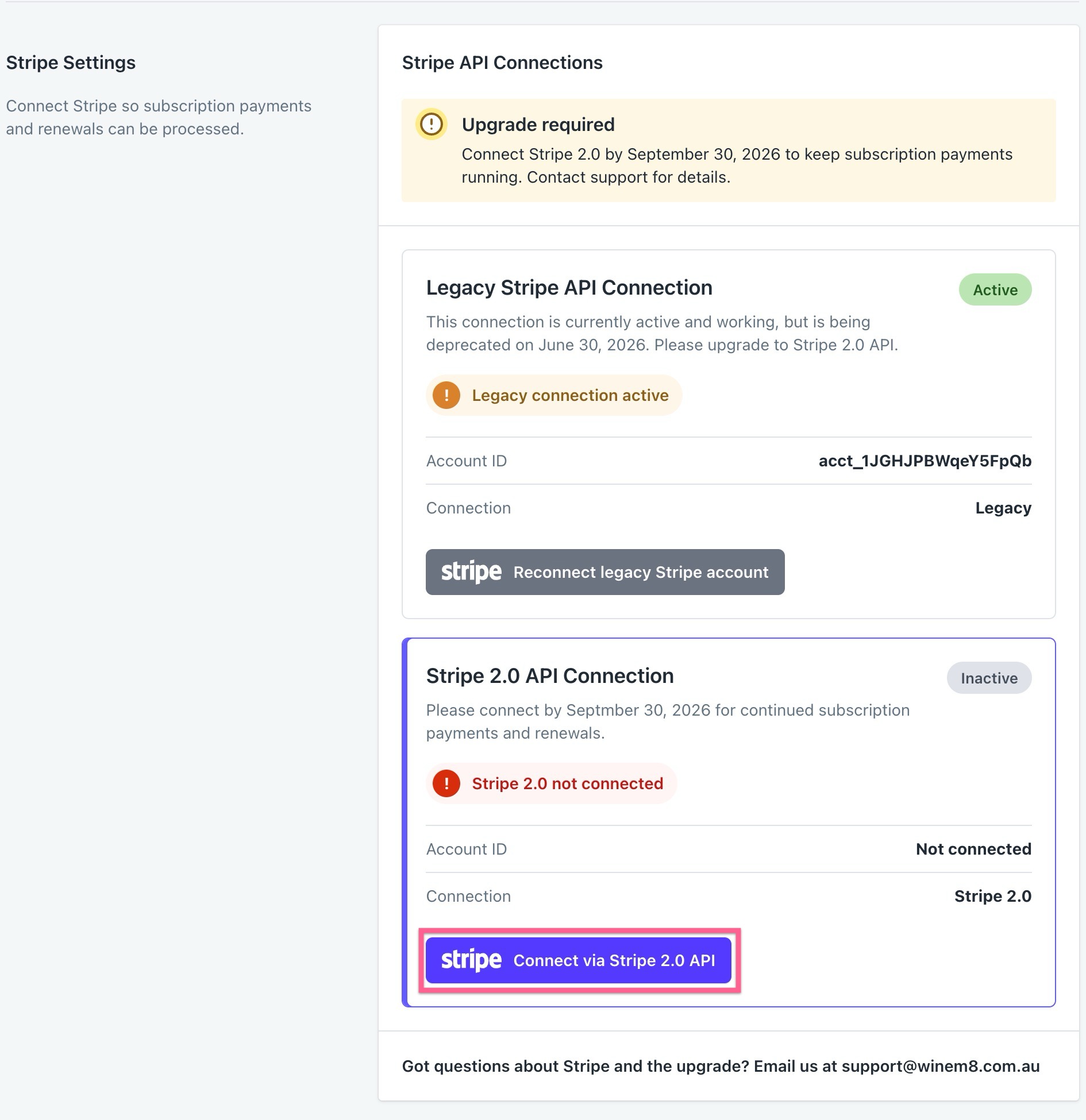
- You will then be prompted to select your account to connect via Stripe.